Learning Modern Linux - ePub
1. Introduction to Linux
2. The Linux Kernel
2.1 Linux Architecture
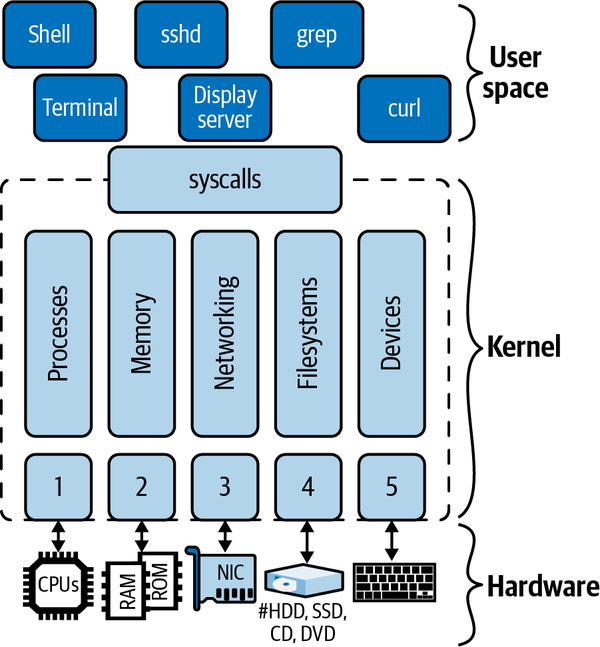
lspcu
cat /proc/cpuinfo
Example of different architectures:
- x86
- ARM
- RISC-V
2.2 Kernel Components
2.2.1 Process Management
- Sessions (SID)
- Process groups (PGID)
- Processes (PID)
- Threads (TID(TGID)
- Tasks
ps -j
PID   PGID  SID   TTY    TIME CMD
6756  6756  6756  pts/0  00:00:00 bash
6790  6790  6756  pts/0  00:00:00 ps
ls -al /proc/6756/task/6756/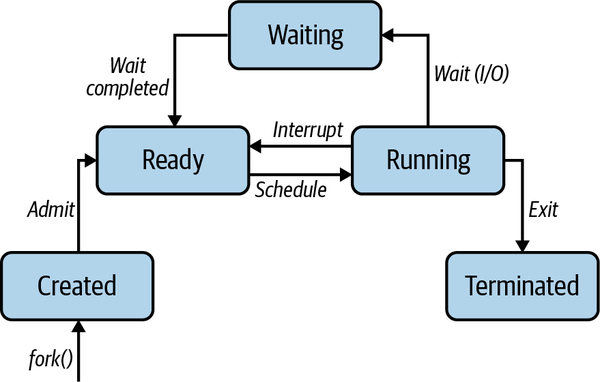
2.2.2 Memory Management
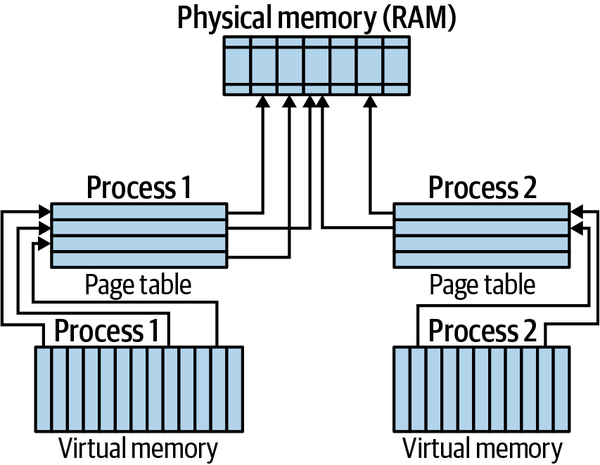
grep MemTotal /proc/meminfo
grep VmallocTotal /proc/meminfo
grep Huge /proc/meminfo
2.2.3 Networking
- Sockets
- Transmission Control Protocol (TCP) and User Datagram Protocol (UDP)
- Internet Protocol (IP)
ip link
ip route
2.2.4 Filesystems
2.2.5 Device Drivers
ls -al /sys/devices/
mount
2.2.6 syscalls
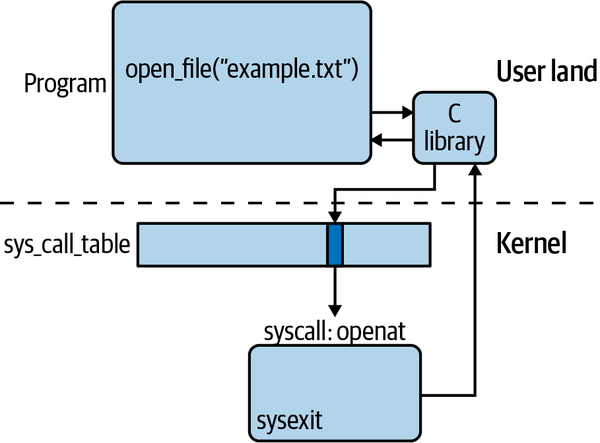
strace ls
strace -c curl -s https://mhausenblas.info > /dev/null
Example syscalls by category:
- Process management: clone, fork, execve, wait, exit, getpid, setuid, setns, getrusage, capset, ptrace.
- Memory management: brk, mmap, munmap, mremap, mlock, mincore.
- Networking: socket, setsockopt, getsockopt, bind, listen, accept, connect, shutdown, recvfrom, recvmsg, sendto, sethostname, bpf.
- Filesystems: open, openat, close, mknod, rename, truncate, mkdir, rmdir, getcwd, chdir, chroot, getdents, link, symlink, unlink, umask, stat, chmod, utime, access, ioctl, flock, read, write, lseek, sync, select, poll, mount.
- Time: time, clock_settime, timer_create, alarm, nanosleep.
- Signals: kill, pause, signalfd, eventfd.
- Global: uname, sysinfo, syslog, acct, _sysctl, iopl, reboot.
2.3 Kernel Extensions
2.3.1 Modules
uname -srm
find /lib/modules/$(uname -r) -type f -name '*.ko*'
lsmod
cat /proc/modules
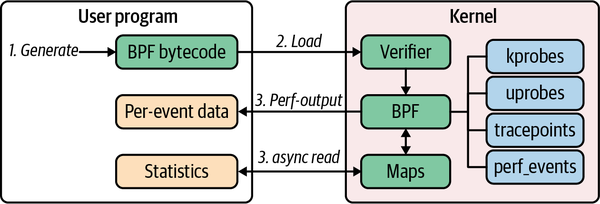
2.3.2 A Modern Way to Extend the Kernel: eBPF
3. Shells and Scripting
3.1 Basics
3.1.1 Terminals
3.1.2 Shells
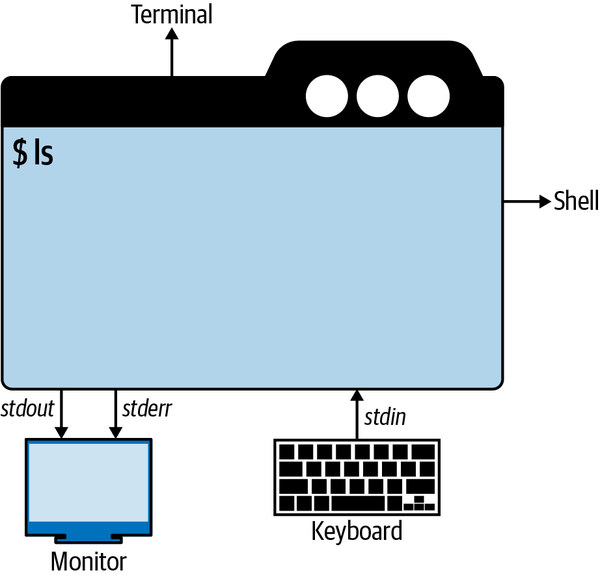
Streams
- stdin (FD0)
- stdout (FD1)
- stderr (FD2)
FD: File Descriptor.
cat
start typing2>redirect stderr1>or>redirect stdout&>redirect both stderr and stdout
curl https://example.com &> /dev/null
curl https://example.com > /tmp/content.txt 2> /tmp/curl-status
head -3 /tmp/content.txt
cat /tmp/curl-status  #C-d to stop
cat > /tmp/interactive-input.txt
tr < /tmp/curl-status [A-Z] [a-z]
curl https://example.com 2> /dev/null | \
wc -l - Ampersand (&) at the end of the command, execute in the background
- Backslash () continue a command next line
- Pipe (|) connect stdout and stdin
Variables
- Environmental variables
- Shell variable
env  # show environmental
set  # show shell
MY_VAR=42
set | grep MY_VAR
export MY_GLOBAL_VAR="Hello!!"
set | grep MY_
env | grep MY_
bash
echo $MY_GLOBAL_VAR
set | grep MY_
exit
unset MY_VAR
set | grep MY_
Environmental variables:
- EDITOR: default editor;
- HOME: home directory;
- HOSTNAME: hostname;
- IFS: characters separate fields;
- PATH: directories for executables;
- PS1: prompt string;
- PWD: working directory;
- OLDPWD: directory before cd;
- RANDOM: random integer 0-32767;
- SHELL: current shell;
- TERM: terminal emulator used;
- UID: current user UID;
- USER: current user name;
- _: last argument previous command;
- ?: exit status;
- $: ID of current process;
- 0: name of current process.
Built-in commands
which ls
type ls
Job control
watch -n 5 "ls" &
jobs
fg
In order to keep a background process running, even after closing the shell, nohup is to be prepended the command.
Further, for a process that is already running and wasn’t prepended with nohup, it could be used disown %JobN, example:
jobs
disown %1
3.1.3 Modern commands
exa
bat list.txt
touch apple.yaml
echo "sample" > apple.yaml
find . -type f -name "*.yaml" -exec grep "sample" '{}' \; -print
rg -t "yaml" sample
jq  # json data processing
3.1.4 Common Tasks
Navigating
Shell navigation and editing shortcuts
- Ctrl+a: Move cursor to start of line;
- Ctrl+e: Move cursor to end of line;
- Ctrl+f: Move cursor forward one character;
- Ctrl+b: Move cursor back one character;
- Alt+f: Move cursor forward one word;
- Alt+b: Move cursor back one word;
- Ctrl+d: Delete current character;
- Ctrl+h: Delete character left of cursor;
- Ctrl+w: Delete word left of cursor;
- Ctrl+k: Delete everything right of cursor;
- Ctrl+u: Delete everything left of cursor;
- Ctrl+l: Clear screen;
- Ctrl+c: Cancel command;
- Ctrl+_: Undo (bash only);
- Ctrl+r: Search history (some shells);
- Ctrl+g: Cancel search (some shells);
In addition, you might wantto know that these shortcuts are based on Emacs editing keystrokes. Should you prefer vi, you can use set -o vi in your .bashrc file.
File content management
cat << FINE > contenuto.txt
heredoc> Prova inserimento testo
heredoc> in nuovo file
heredoc> FINE
cat contenuto.txt
Altri comandi interessanti:
- diff
- head
- tail
3.2 Human-Friendly Shells
- Fish
- Z-shell
- Oil shell
- murex
- Nushell